
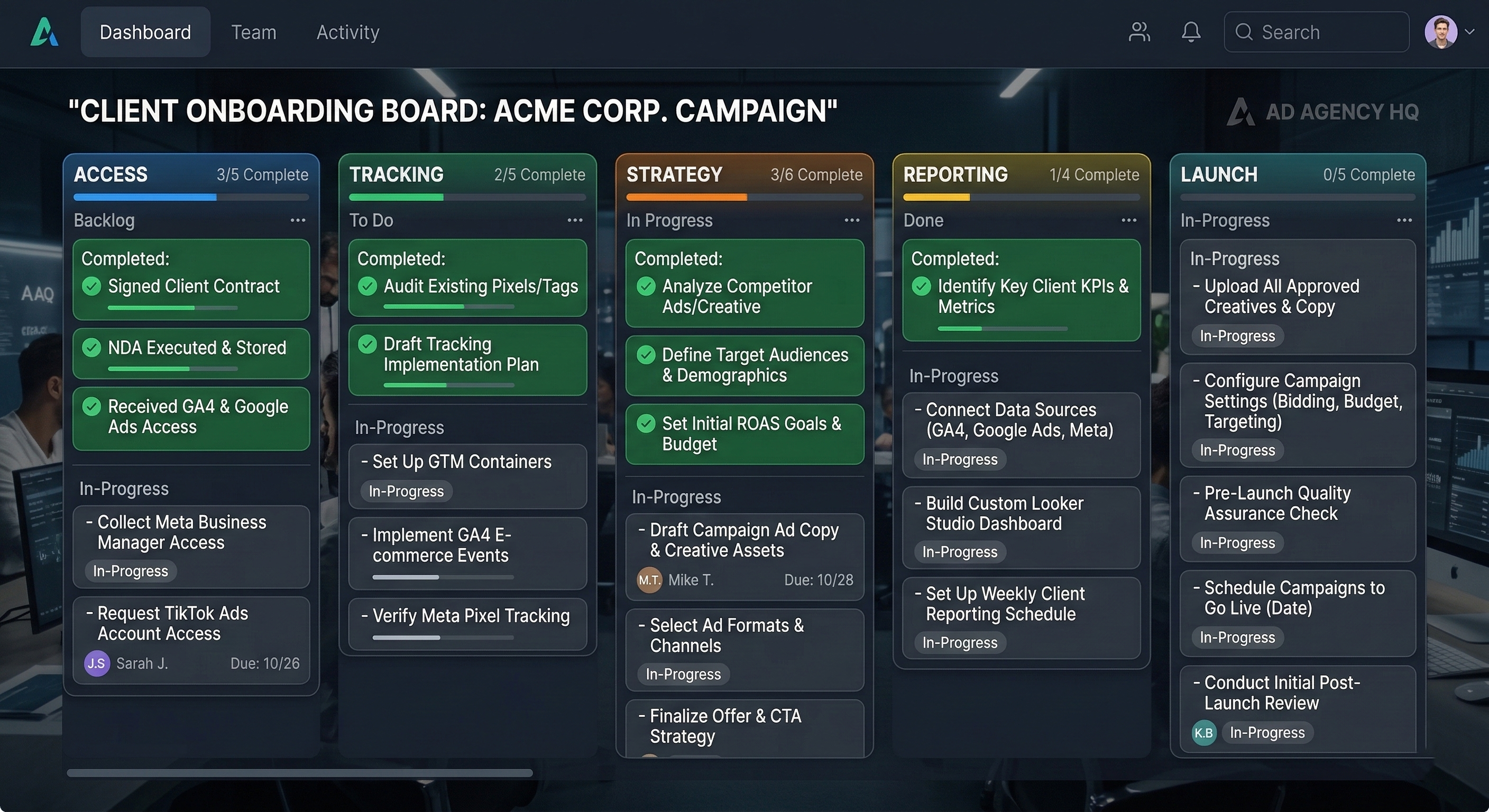
The first 14 days of a new client relationship set the tone for everything that follows. And at most agencies, those 14 days are chaos.
The contract is signed. Everyone is excited. Then reality hits. Someone needs ad account access. The client's Business Manager has three admins, none of whom respond promptly. The tracking pixel was installed two years ago by a developer who no longer works there. The naming conventions from the previous agency are a mess. There is no historical baseline. And by week three, the team is still sorting access issues instead of running campaigns.
The agencies that grow past 10 clients without losing their minds solved onboarding early.
Why Onboarding Chaos Compounds
Delayed campaign launches. Every day chasing access is a day your campaigns are not running. For a client paying $5,000 per month, a two-week delay before any ads go live is not a great look.
Incorrect baselines. Without a KPI snapshot at onboarding, you have no way to demonstrate improvement. Three months in, "are things better?" becomes unanswerable.
Access surprises. Finding out in week four that the Facebook pixel is owned by the previous agency's Business Manager is an onboarding failure that becomes an operational crisis.
Trust erosion. Clients notice when onboarding is disorganized. Repeated requests for the same information, confusion about access --- these signal that your operations are not as sharp as your pitch deck.
The Six Phases of Client Onboarding
Phase 1: Access and Account Architecture (Days 1-3)
- [ ] Client grants Partner access to Meta Business Manager
- [ ] All active ad accounts identified and connected
- [ ] Google Ads accounts connected (if applicable)
- [ ] Previous agency access revoked or scheduled
- [ ] Facebook Page and Instagram account access confirmed
- [ ] Google Analytics access granted
- [ ] Dedicated client workspace created with ad accounts and pages linked
One workspace per client, no exceptions. Cross-client data contamination is a certainty at scale. Isolated workspaces prevent it.
Phase 2: Tracking and Measurement (Days 2-5)
- [ ] Meta Pixel installed and firing correctly
- [ ] Conversion events configured (Purchase, Add to Cart, Lead, etc.)
- [ ] Conversion API (CAPI) set up for server-side tracking
- [ ] Test purchase/lead completed to verify end-to-end tracking
- [ ] Cross-reference ad platform data with e-commerce platform
- [ ] Primary KPI and target values agreed with client
- [ ] Attribution window documented
Do not skip the test conversion. A surprising number of agencies inherit accounts where the pixel has been silently broken for months.
Phase 3: Historical Audit and Baseline (Days 3-7)
- [ ] Pull last 30, 60, and 90-day performance data
- [ ] Document baseline ROAS, CPA, CPC, CPM, CTR
- [ ] Identify top and worst performing campaigns
- [ ] Flag campaigns in learning limited or error states
- [ ] Identify audience overlap and frequency concerns
- [ ] Document gaps in current setup
This baseline becomes your "before" snapshot. Every improvement you deliver is measured against these numbers.
Phase 4: Naming Conventions and Structure (Days 5-7)
- [ ] Define consistent campaign naming (e.g., [Objective]_[Audience]_[Creative Theme]_[Date])
- [ ] Define ad set naming with targeting descriptors
- [ ] Define creative naming with format, concept, and version number
- [ ] Document structure in a shared reference
Six months from now, naming conventions determine whether reports are immediately readable or require detective work.
Phase 5: Reporting and Communication Setup (Days 7-10)
- [ ] Reporting cadence agreed (daily digest, weekly report, monthly deep dive)
- [ ] Report format agreed (Slack, PDF deck, dashboard, or combination)
- [ ] Automated daily digests configured
- [ ] Communication channel established
- [ ] Meeting cadence agreed
- [ ] Budget and performance alerts configured
- [ ] Comment monitoring activated
Phase 6: Strategy and Launch Readiness (Days 10-14)
- [ ] Creative assets catalogued and brand guidelines documented
- [ ] Campaign structure mapped with budget allocation
- [ ] First campaign set ready for launch
- [ ] All checklist items verified
- [ ] Onboarding summary sent to client
What This Looks Like With Glued MCP
Using Glued's MCP API and the Workspace Onboarding Audit skill, the inventory and audit phases run automatically. In a recent onboarding, the system scanned all connected workspaces, inventoried 6 ad accounts and 4 pages across 3 workspaces, verified connection status for each, pulled baseline KPIs (30/60/90-day performance snapshots), and generated a gap report identifying 2 missing ad account connections, 1 unlinked Instagram page, and 3 campaigns in learning-limited state --- all structured into a prioritized action list with severity classifications.
The audit replaced what would have been 3-4 hours of manual checking with a structured report that surfaced every issue before the team touched a single campaign.
Making Onboarding Repeatable
The first time you use a proper checklist, it takes longer than ad hoc. By the fifth time, your team moves through it on autopilot --- consistent, thorough, and fast.
- After every onboarding, do a brief retrospective. What caused delays? What should be added?
- Every quarter, review against platform changes and your service offering.
- When you hire, the checklist becomes the training manual. It captures institutional knowledge that would otherwise live only in senior team members' heads.
The goal: onboarding quality independent of which team member handles it.
First Impressions Set the Relationship
An agency that shows up on day one with a structured plan, communicates progress, documents baseline performance, identifies issues proactively, and delivers a clear summary --- that agency looks professional and trustworthy.
The checklist is not overhead. It is the foundation of every successful client engagement.
Ready to systematize your client onboarding? Glued's workspace architecture gives each client an isolated environment with its own ad accounts, pages, and team permissions. The MCP API enables automated onboarding audits that inventory accounts, pull baselines, and surface gaps. Start your free trial at glued.me and make every onboarding feel like your hundredth, not your first.