
It is Monday morning, 7:42 AM. You have not finished your first coffee, and your inbox already has three client emails asking for last week's ad performance numbers. Your account manager is scrambling to pull data from Meta Ads Manager for one client, Google Ads for another, and trying to reconcile a third client's spend discrepancies in a spreadsheet that has seventeen tabs and a formula that broke sometime around 2 AM on Friday.
This is not a hypothetical scenario. This is the weekly reality for thousands of digital advertising agencies, and it is quietly destroying margins, burning out teams, and driving client churn.
If you run an agency managing multiple ad accounts, you already know the feeling. The question is not whether manual reporting is a problem. The question is how long you can afford to keep doing it.
The Real Cost of Manual Reporting
Most agency owners dramatically underestimate how much manual reporting actually costs them. It is not just the hours spent pulling numbers. It is everything those hours displace.
The Time Tax
Consider a modest agency with 10 active clients. Each client expects a weekly performance report. Even with templates and shortcuts, pulling data, formatting it, adding commentary, and sending it out takes roughly two hours per client per week.
That is 20 hours every single week spent on reporting. Over a month, that balloons to 80 hours. Over a year, you are looking at roughly 1,040 hours --- the equivalent of six full months of a senior team member's working time, consumed entirely by copy-pasting numbers into spreadsheets.
Now multiply that by your team's hourly rate. If that account manager costs you $50/hour fully loaded, you are spending $52,000 per year just on the mechanical act of building reports. Not on strategy. Not on optimization. Not on winning new business.
The Error Problem
Manual processes breed mistakes. A misplaced decimal turns a 3.2x ROAS into a 32x ROAS. A wrong date range makes last week's data look like this week's. A copy-paste error sends Client A's numbers to Client B.
These errors are not just embarrassing. They erode the one asset your agency cannot survive without: client trust. One bad report can undo months of relationship building. Two bad reports often trigger an agency review.
The Churn Connection
Clients do not leave agencies solely because of performance. They leave because they feel out of the loop, uninformed, or uncertain about where their budget is going. Inconsistent, late, or error-riddled reports accelerate that feeling faster than a dip in click-through rates ever could.
When your team is buried in reporting work, they are not proactively reaching out to clients with insights. They are not catching the budget anomaly before it becomes a crisis. They are reactive instead of strategic, and clients can feel the difference.
What Automated Client Reporting Actually Means
Let's clear up a common misconception. Automated reporting does not mean firing your account managers and replacing them with robots. It means removing the mechanical grunt work so your team can focus on what actually requires human judgment --- interpretation, strategy, and client relationships.
An automated client reporting system handles the repetitive layer:
- Data collection: Pulling metrics from Meta, Google Ads, and other platforms on a set schedule, without anyone logging into each dashboard manually.
- Report generation: Assembling the numbers into a structured format with the KPIs each client cares about.
- Delivery: Sending reports to the right people at the right time, every time, without someone remembering to hit "send."
- Alerting: Flagging anomalies like sudden spend spikes or budget pacing issues before they become problems.
Your team still writes the strategic commentary. They still hop on calls with clients to discuss what the numbers mean. But they no longer spend their Monday mornings wrestling with spreadsheets just to produce the raw data layer.
Key Features to Look for in an Agency Ad Reporting Tool
Not all reporting tools are built for agency workflows. When evaluating an automated client reporting solution, these are the capabilities that separate a useful tool from one that creates new headaches.
Multi-Workspace Architecture
Every client should live in its own isolated workspace. This is not optional. You need clean separation between client data, team permissions, and report configurations. Mixing clients in a single view is how accidental data leaks happen.
Scheduled Report Delivery
Look for flexible scheduling --- daily campaign digests, weekly summaries, or custom cadences based on each client's preferences. The system should deliver reports automatically without anyone manually triggering them.
Role-Based Access Control
Your agency has account managers, strategists, executives, and clients who all need different levels of visibility. A solid tool provides granular roles --- Admin, Collaborator, Guest --- so each person sees exactly what they should and nothing they should not.
Pre-Built Report Templates
You should not have to build every report from scratch. The best tools come with ready-made templates for the reports agencies actually need:
- Daily campaign performance digests
- Top-performing ads rankings
- Budget reduction and pacing alerts
- Landing page ROAS breakdowns
- Scale opportunity recommendations
Shareable Report Links
Clients often need to forward reports to their own stakeholders --- a CEO, a board member, a marketing VP. Shareable links with appropriate access controls make this seamless without requiring everyone to create an account.
Native Integrations with Communication Tools
Reports that land in email inboxes get buried. The best delivery channel is the one your team already lives in, and for most agencies, that is Slack.

How to Set Up Automated Reporting Workflows
Transitioning from manual to automated reporting does not require a six-month migration project. Here is a practical workflow to get started:
Step 1: Audit your current reporting process. List every client, every report they receive, the frequency, the metrics included, and who on your team is responsible. This inventory becomes your automation blueprint.
Step 2: Set up isolated workspaces for each client. Migrate each client's ad accounts into their own workspace. Connect the relevant Meta and Google Ads accounts to each workspace.
Step 3: Configure report schedules per client. Some clients want daily digests. Others only need a weekly summary. Set each client's delivery cadence based on their actual needs, not a one-size-fits-all default.
Step 4: Assign team roles and permissions. Give account managers Collaborator access to their clients' workspaces. Give clients Guest access with view-only permissions. Keep Admin access limited to senior team members.
Step 5: Enable alerting for anomalies. Configure budget pacing alerts and performance threshold notifications so your team catches issues before clients do. This is where automation shifts from saving time to actively protecting client relationships.
Step 6: Train your team on the new workflow. The biggest risk in any automation rollout is adoption. Walk your team through the system, show them how much time it saves, and make it clear that the goal is to free them up for strategic work, not to replace them.
The Slack-First Reporting Approach
Email is where reports go to die. They get buried under newsletters, meeting invites, and reply-all threads. By the time your client opens last Tuesday's report, it is already irrelevant.
A Slack-first approach to agency reporting changes the dynamic entirely.
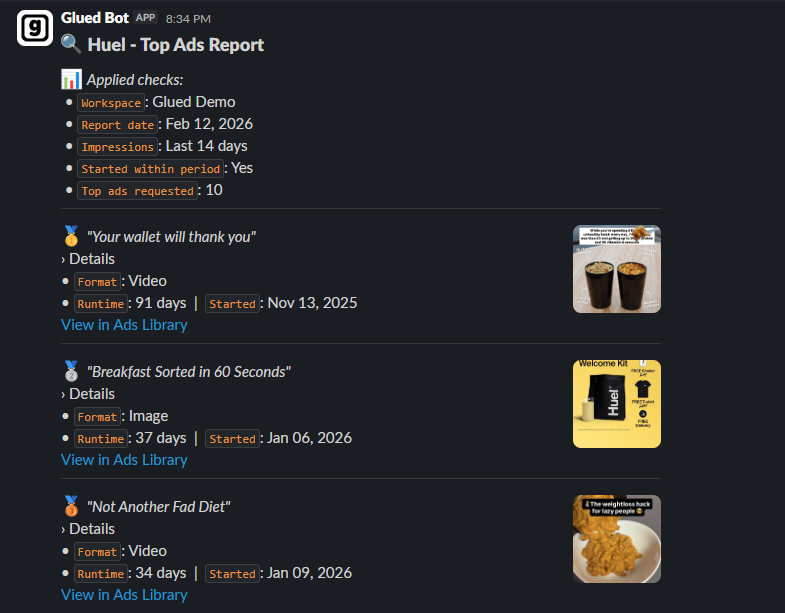
When ad performance reports arrive directly in a Slack channel, they become part of the working conversation. Your account manager sees the daily digest, notices a ROAS dip on a key campaign, and posts a note in the client channel with context and a recommended action --- all before the client even asks.
This is what proactive client management looks like. Not because your team suddenly got faster at spreadsheets, but because the spreadsheet step disappeared entirely.
Scheduled Slack digests also create a natural rhythm of communication. Clients get used to seeing performance updates land at the same time every day or every week. That consistency builds confidence. When a client knows they will always have fresh numbers waiting for them, they stop sending those anxious Monday morning emails.
For agencies managing ten, twenty, or fifty clients, this scales in a way that manual email-based reporting never can.
Maintaining Client Trust Through Automation
Some agency owners worry that automating reports will feel impersonal. That clients will notice the human touch is gone and start questioning the value of the relationship.
In practice, the opposite happens. Automated reporting improves client trust for three reasons:
Consistency removes doubt. When reports arrive on schedule every single time without fail, clients stop wondering whether their agency is paying attention. Reliability is a trust signal that no amount of charming email prose can replicate.
Accuracy eliminates embarrassment. Automated systems do not transpose digits or pull the wrong date range. The data is always clean, always current, and always correct. That baseline accuracy gives clients confidence in every number they see.
Speed enables proactivity. When your team is not spending Monday buried in spreadsheets, they have time to actually analyze the data, spot trends, and bring insights to clients before they are asked. Proactive communication is the single strongest predictor of long-term client retention.
The human touch is not in the mechanical assembly of a report. It is in the strategic conversation that happens after the report is delivered. Automation does not remove the human element --- it creates space for it.

How Glued Fits Into This Picture
Glued was built specifically for teams managing advertising across multiple clients and accounts. It addresses the exact pain points outlined in this article:
- Multi-workspace architecture keeps every client's data cleanly separated, with dedicated workspaces for each account.
- Automated Slack report delivery on daily, weekly, or custom schedules means your team never has to manually send another report.
- Pre-built report templates cover daily campaign digests, top ads rankings, budget reduction alerts, landing page ROAS breakdowns, and scale recommendations out of the box.
- Role-based access control with Admin, Collaborator, and Guest roles gives you granular control over who sees what across every workspace.
- Shareable report links let clients forward performance data to their own stakeholders without friction.
Instead of spending 20 hours a week pulling numbers, your team spends that time on strategy, optimization, and the client conversations that actually prevent churn.
Stop Trading Hours for Spreadsheets
Manual reporting is not a minor inconvenience. It is a structural problem that compounds as your agency grows. Every new client adds another two hours per week to the reporting burden, and at some point the math simply does not work.
The agencies that scale successfully are the ones that automate the mechanical layer early. They invest their team's time in thinking, not typing. They deliver reports that are always on time, always accurate, and always actionable.
If your Monday mornings still start with a scramble to update spreadsheets, it might be time to try a different approach.
[Start your free trial of Glued](https://glued.me) and see what your agency looks like when reporting runs itself.